


 Home
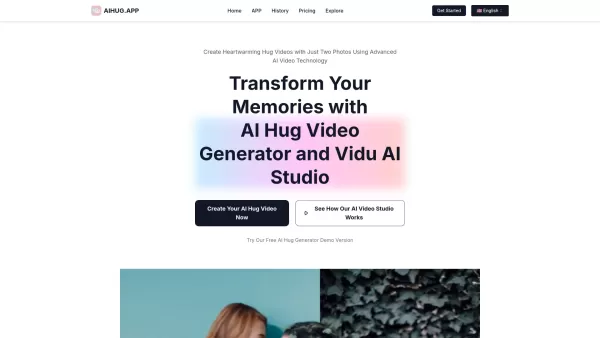
HomeAI Hug Video Generator, Hug Video Studio
AI Hug: Create Heartfelt Videos from Photos



Helps TikTok sellers, brands, MCNs, and TAPs discover winning products and find creators.

HelpLook is an AI-powered all-in-one knowledge base tool that helps businesses quickly build knowledge bases, help centers, and...

Your AI Workspace

302.AI is an enterprise-grade AI resource platform with pay-as-you-go pricing, API access to a full range of AI models, and ready-to-use online applications.

剧火AI — AI Screenwriter + Director, a One-Person Short Drama Studio In one sentence, what is it?

What is Deepfake Maker? Deepfake Maker is a comprehensive, browser-based AI tool for creating deepfakes, tailored for creators, marketers, and designers who need striking visuals without complicated software. It combines multiple AI capabilities: adv

What is Celebrity AI?CelebrityAI revolutionizes digital content creation with its cutting-edge artificial intelligence platform that generates lifelike celebrity videos and voice messages. Using sophisticated technologies including deep neural networ

What is Makefilm?Makefilm revolutionizes video creation as a comprehensive AI-powered platform that streamlines professional-quality video production. This innovative solution combines multiple smart tools into one seamless workflow - transforming te
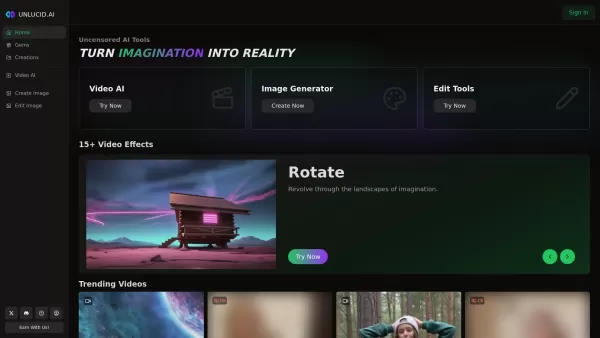
What is Unlucid AI? Unlucid AI provides free, uncensored AI tools empowering creators to craft, edit, and animate videos using advanced AI technology. It transforms imagination into reality with unres

What is AIShowX?AIShowX represents the next generation of creative tools - a comprehensive online platform powered by artificial intelligence that empowers anyone to produce professional-quality videos, images, and audio content with remarkable ease.
AI Hug Video Generator, Hug Video Studio Product Information
What is the AI Hug Video Generator or Hug Video Studio?
The AI Hug app leverages advanced artificial intelligence to turn still photos into animated videos of a warm embrace. Just upload two pictures, and it will craft a realistic video that feels like a genuine hug. This creative tool is perfect for sharing feelings and memories in a novel, touching way, ideal for social media or personal mementos.
Who is the AI Hug Video Generator, Hug Video Studio for?
- People in long-distance relationships
- Families aiming to stay connected
- Friends who are far apart
- Content creators seeking unique, engaging material
- Anyone who wants to show emotions in a creative format
How to Use the AI Hug Video Generator, Hug Video Studio?
- Step 1: Download and install the AI Hug application.
- Step 2: Launch the app and choose to start a new hug video project.
- Step 3: Upload two clear photos of the people you wish to see hugging.
- Step 4: Personalize the video using settings like background music or text overlays.
- Step 5: Preview your creation and tweak it if needed.
- Step 6: Save the final video or share it instantly on your favorite social networks.
Platform Availability
- Web
- iOS
- Android
AI Hug Video Generator, Hug Video Studio: Core Features & Benefits
Key Features
- Transform photos into hugging videos
- Customizable video results
- Simple sharing capabilities
Key Benefits
- Enhance connections in long-distance relationships
- Produce lasting digital keepsakes
- Express feelings through creative animation
Primary Use Cases & Applications
- Sending virtual hugs to family and friends
- Commemorating special moments and celebrations
- Crafting emotional stories for social media posts
AI Hug Video Generator, Hug Video Studio: Pros & Cons
Advantages
Employs cutting-edge AI for highly realistic hug animations
User-friendly process requiring just two photos
Options to customize hug style, background, and added text
Works for any relationship type or occasion
Provides flexible subscription tiers for varying user needs
Disadvantages
AI-generated videos might occasionally show minor artifacts
The software is not open-source
No direct app store links or browser extensions are offered
AI Hug Video Generator, Hug Video Studio Pricing
Free plan available | No |
|---|---|
Free trial details | |
Pricing model | Paid |
Credit card required | No |
Plans start from | 10.43 USD |
Lifetime plan available | No |
Billing frequency | Annual billing |
Pricing Plan Details
Basic Plan
10.43 USD
- Create up to 20 AI hug videos
- Fast generation speed
- Image-to-video conversion for hug scenes
- Unlimited scenarios for text-to-video generation
- Permission for commercial use
Pro Plan
20.93 USD
- Create up to 60 AI hug videos
- Fast generation speed
- Unlimited scenarios for image-to-video conversion
- Unlimited scenarios for text-to-video generation
- Permission for commercial use
Unlimited Plan
41.93 USD
- Unlimited AI hug video creation
- Option for private sharing
- Fast generation speed
- Unlimited scenarios for image-to-video conversion
- Unlimited scenarios for text-to-video generation
- Full commercial use license
Discount Offer:
Save 30% with annual billing
For the most current pricing, please visit: https://aihug.app
Frequently Asked Questions about AI Hug
What kind of photos work best?
You can use any two clear, well-lit photos of people to generate the hugging video.
Is the app free?
AI Hug provides basic features for free, with advanced options available through paid plans.
Can I share my videos on social media?
Absolutely. You can share your videos directly to various social media platforms from the app.
How long does video creation take?
Videos are usually ready within minutes, though complex customizations may take a little longer.
What about my privacy?
Your uploaded images are processed only for creating your video and are not stored on our servers.
Is the app available in my country?
Yes, the AI Hug app is accessible for download worldwide.
What image file formats are supported?
Common formats like JPG and PNG are fully supported.
Can I create different types of hugs?
Yes, you can create a wide range of hug scenarios provided you have suitable photos.
Is customer support offered?
Yes, customer support is accessible directly through the application.
Can I make changes after generating the video?
Yes, you can revisit and adjust settings before saving or sharing your final video.
Company Information: AI Hug Video Generator, Hug Video Studio
Website:
https://aihug.meCompany Name:
AI HugSupport Email:
Not AvailableFacebook:
Not AvailableX (Twitter):
Not AvailableYouTube:
Not AvailableInstagram:
Not AvailableTikTok:
Not AvailableLinkedIn:
Not Available
AI Hug Video Generator, Hug Video Studio Screenshot

2026 Latest Best Top-rated AI Text to Speech Tools for Online Courses are curated by XIX.AI based on rigorous real-world tests and weekly updated rankings. These powerful tools help creators deliver crystal-clear audio content effortlessly, boosting writing efficiency and streamlining course production. Check out the free vs paid comparison to find your perfect fit. Explore now to unlock your AI edge in online education.
 10 tools
 xix.ai

2026 Latest Best Top-Rated AI Blog Title Tools for Higher Click Through Rates! XIX.AI has carefully curated a powerful, game-changing collection of top tools that go through rigorous real-world tests. You’ll find a free vs paid comparison, weekly updated rankings, and detailed insights to help you boost your blog’s traffic efficiently. Must-try options are highlighted to help you unlock your AI edge. Explore now!
10 tools
xix.ai

2026 Latest Best Top-rated AI Task Routing Tools for Support Workflows! XIX.AI has curated a highly powerful game-changing collection of must-try solutions, all undergoing rigorous real-world tests and updated weekly. These tools streamline workflows, boost productivity, and help teams deliver faster, more efficient support. Explore now to discover your perfect tool and unlock your AI edge!
17 tools
xix.ai

2026 Latest Best Top-Rated AI Citation and Paper Summary Tools Curated by XIX.AI. Get powerful game-changing solutions for quick content creation, improved writing efficiency, and boosting productivity. We offer a free vs paid comparison along with real-world tests and weekly updated rankings to help you find the must-try tool that fits your needs perfectly. Explore now to Unlock your AI edge.
10 tools
xix.ai

2026 Latest Best Top-Rated AI Productivity Tools for Daily Work! XIX.AI has curated a powerful, game-changing selection based on rigorous weekly updated rankings and real-world tests. You’ll find must-try options that boost writing efficiency, streamline content creation, and help you overcome daily work challenges. Get a free vs paid comparison to find the perfect fit for your needs. Explore now to unlock your AI edge!
9 tools
xix.ai

2026 Latest Best Top-Rated AI Systematic Review Tools for Research Screening are here on XIX.AI! This curated collection includes powerful, game-changing solutions that go through rigorous real-world tests to deliver accurate results. We also offer a free vs paid comparison along with weekly updated rankings to help you find the must-try option that boosts your research efficiency significantly. Explore now to unlock your AI edge in academic work!
11 tools
xix.ai


