


 Home
Home

TouchRetouch APP
Introduction to TouchRetouch APPTouchRetouch APP is a professional AI image erasing tool that focuses on quickly removing unwanted objects from photos. With its intelligent recognition and repair tech
 0
0






About this application
Introduction to TouchRetouch APP
TouchRetouch APP is a professional AI image erasing tool that focuses on quickly removing unwanted objects from photos. With its intelligent recognition and repair technology, it can easily remove debris, lines, skin blemishes, etc. from the image, and supplemented with copy stamp and eraser tools for fine retouching. Users can make unwanted elements disappear by simply painting or marking them, and the software will automatically complete the intelligent filling and repairing. With its efficient process and excellent restoration results, TouchRetouch has become a powerful assistant for many users when dealing with images.
TouchRetouch APP Core Functions
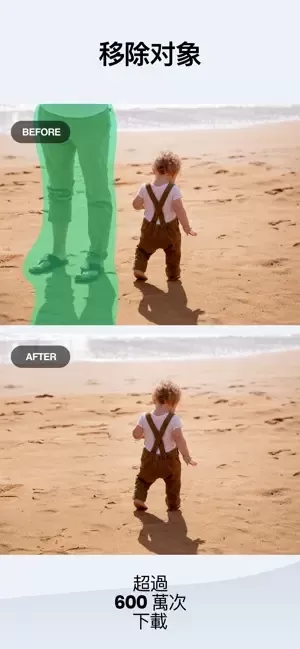
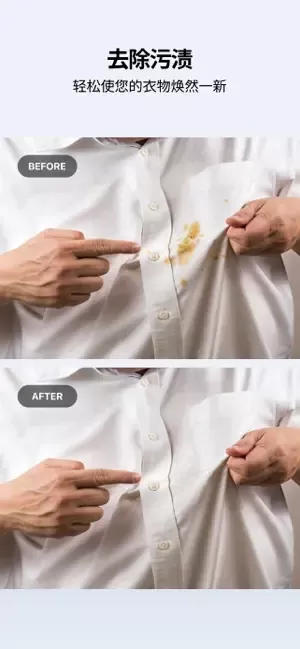
- Remove Extra Elements: Intelligently recognizes and removes extra objects in the photo, such as wires, poles, and passers-by, to make the picture cleaner and neater.
- Repair minor blemishes: Provides a blemish repair tool to easily remove minor blemishes such as acne, skin spots, and more.
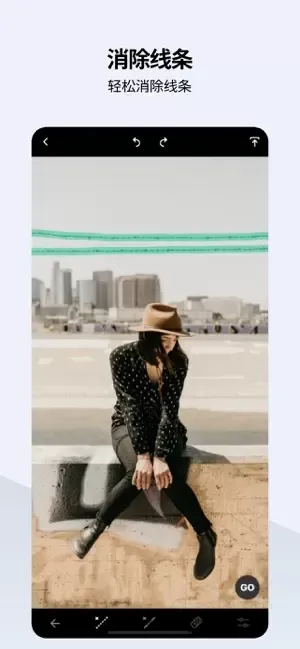
- Remove Lines: Quickly eliminate straight or curved cracks, scratches, and other line marks from your photos.
- Duplicate Stamp Tool: Allows users to duplicate specific areas of an image to cover or repair other parts, and adjust the size, feathering and transparency of the duplicates.
- Eraser Tool: Provides an eraser function to erase previously copied or repaired content, and allows you to adjust the erasing effect.
- Smart Fill: After removing an object, the software will automatically fill it in according to the content of the surrounding image, ensuring a natural and seamless transition.
Introducing the latest version
This is a useful retouching tool in your pocket that helps you quickly remove unwanted objects from your photos, saving you valuable time and making your photos more concise.
A seemingly insignificant protruding object can sometimes completely ruin the overall composition of a photo, making it look flat and uninteresting. But the popular TouchRetouch app solves this problem.
ADVA Soft is committed to innovation. We are constantly optimizing TouchRetouch's technology and features to enhance its visual processing. Recent updates, including mesh elimination, a new elimination algorithm based on edge object perception, and easier-to-use tools, are just some of the improvements we've made in response to user demand, and we'd like to thank our loyal users for them.
TouchRetouch's features are described in more detail below.
Benefits:
- No need to provide personal information
- No loss of image quality or photo capturing information
- Easily achieves professional-grade photo editing results
Tips and tricks
Auto object removal. algorithm works best with even backgrounds.
What are the amazing things you can do with TouchRetouch?
- Remove wires, cables, and other threaded objects
- Remove road signs, trash cans, traffic lights, and other objects
- Eliminate grids in the foreground
- Remove unwanted people in the background
- Remove pimples, freckles, and wrinkles naturally
- Clean up distractions in travel photos
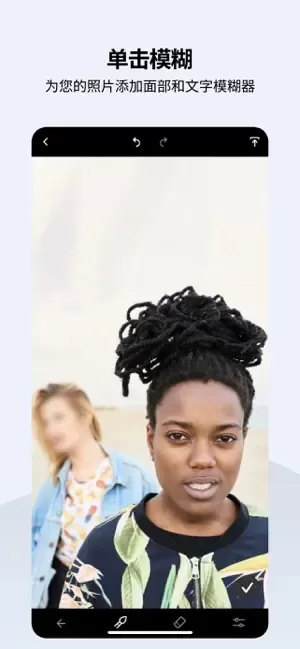
- Remove text from Instagram and Snapchat posts
- Restore old photos
How do I perform these editing operations?
Quick retouching in one click
This app is suitable for quick photo processing.
Simply mark tiny imperfections and remove small problems that ruin the look and feel of the picture in seconds.
To remove a line from a picture, simply paint a section of the line or click on it to remove it completely. No precise manipulation is required; the app automatically recognizes the entire line! In manual retouch mode, all lines are equipped with control points, giving you greater control precision and flexibility when adjusting curve segments.
Magically Make Objects Disappear
The app cleans up the screen in seconds, whether it's unwanted characters in the background or other detail issues. You can use the brush tool to automatically remove content, or if you're not satisfied with the results, you can switch to manual retouching mode and use the clone stamp to make fine repairs.
Automatic mesh detection and removal
If you find the task of "removing the mesh" a bit tricky, try TouchRetouch, which offers a convenient solution in just two steps. Select the tool from the main menu, click the "Continue" button, and the grid disappears like magic. The entire detection and selection process is done automatically by the algorithm without any additional manual intervention.
Help and Tutorials
Check out the in-app tutorials and get your hands dirty to learn how to use the features.
With just a little practice, you'll be a pro at using TouchRetouch. With a clear and intuitive layout, new users will be able to get started quickly and comfortably.
Download TouchRetouch now and experience the magic of retouching.
TouchRetouch is created by ADVA Soft, a team of like-minded professionals and passionate innovators dedicated to developing smart, easy-to-use apps that transform your photos and save you time. Visit the official website www.adva-soft.com to learn more about us and the applications we develop.
For help with TouchRetouch, 请发送邮件至[email protected]联系ADVA Soft support team. We welcome your inquiries, comments and suggestions.
Like TouchRetouch? Would you like to join the Beta test group to help us further enhance the product? 请将您的反馈发送至[email protected].
Terms of Use:
https://www.apple.com/legal/internet-services/itunes/dev/stdeula/
Privacy Policy.
https://adva-soft.com/privacy-policy-tr.html
January 2, 2026

2026 Latest Best AI Pull Request Review Tools for GitHub Teams are here on XIX.AI! This top-rated curated list showcases powerful game-changing solutions that streamline refactoring, bug fixing, and security gap detection across all team workflows. Enjoy a free vs paid comparison along with real-world tests and detailed rankings to help you find the perfect tool that boosts productivity significantly. Explore now to unlock your AI edge!
 12 tools
 xix.ai

2026 Latest Best Top-rated AI Text to Speech Tools for Natural Voiceovers are here on XIX.AI! This curated list features powerful, game-changing options that deliver crystal-clear voices for every use case, backed by real-world tests and weekly updated rankings. Get a free vs paid comparison to find the must-try solution that boosts your productivity instantly. Explore now to Unlock your AI edge!
11 tools
xix.ai

2026 Latest Best Manga AI Background Generators Ranked Top-Rated! This curated collection showcases powerful game-changing tools perfect for creating high-quality chapter backgrounds, book covers, and promotional art. Every option has undergone rigorous real-world tests to ensure reliability. Get a free vs paid comparison along with detailed insights. Explore now to discover your perfect tool and unlock your AI edge in manga creation.
6 tools
xix.ai

2026 Latest Best Top-rated AI Object Removal Editors for portraits travel product shots! XIX.AI curates a powerful game-changing collection regularly updated with weekly rankings. These tools offer real-world tests to help you quickly remove unwanted elements, boost content quality, and save tons of time without compromising results. Must-try for anyone aiming to unlock their AI creation edge. Explore now!
10 tools
xix.ai

2026 Latest Best Top-rated AI Text to Speech Tools for Online Courses are curated by XIX.AI based on rigorous real-world tests and weekly updated rankings. These powerful tools help creators deliver crystal-clear audio content effortlessly, boosting writing efficiency and streamlining course production. Check out the free vs paid comparison to find your perfect fit. Explore now to unlock your AI edge in online education.
10 tools
xix.ai

2026 Latest Best Top-Rated AI Blog Title Tools for Higher Click Through Rates! XIX.AI has carefully curated a powerful, game-changing collection of top tools that go through rigorous real-world tests. You’ll find a free vs paid comparison, weekly updated rankings, and detailed insights to help you boost your blog’s traffic efficiently. Must-try options are highlighted to help you unlock your AI edge. Explore now!
10 tools
xix.ai


TouchRetouch 정말 대단한 앱이에요! 사진 속 불필요한 물체를 지우는 것이 너무 쉬워졌습니다. AI 기술이 깔끔하게 지워주는 것에 놀랐어요. 가끔 복잡한 배경에서는 조금 아쉬울 때도 있지만, 대부분의 경우 완벽하게 작동합니다.👍
Just tried TouchRetouch for cleaning up my vacation photos, and it's magic! 🧹 Removed some annoying tourists in the background with just a few taps. The AI fill is surprisingly seamless. Makes photo editing feel less like a chore and more like fun! Definitely worth it for anyone who loves photography.
This app is a lifesaver for photo editing! Used it to remove photobombers and random objects from my vacation pics—worked like magic with just a few taps. The clone stamp tool is a bit tricky to master though. Highly recommend for quick fixes! 😊
Similar applications

Dimmer AI APP is an AI painting generation and socialization platform launched by Shenzhen Yingkue Technology Co., Ltd, which integrates a variety of AI painting tools, including the big painter Domo,
PicLumen: AI Image Creation and Sharing PlatformPicLumen is an AI-powered image generation tool that quickly transforms textual descriptions into beautiful visual artwork. Users can generate images co
Introduction of Drafting DesignDrafting Design is a powerful AI intelligent design tool that integrates core functions such as AI copy generation, AI design, AI drawing and AI retouching. It can help

Introduction of LoveDesign PlatformLoveDesign is a smart poster design and image editing tool. The platform has more than 300,000 genuine template materials, covering more than 50 industry segments, w

Introduction to DojiDoji is a smart fashion fitting app that lets you virtually try on clothes from a wide range of designer brands through your phone. With advanced AI technology, you can instantly s
The Fascination of Luma AI APPLuma AI is a breakthrough 3D capture and generation app that, with its cutting-edge AI technology, makes it easy for everyone to capture and create detail-rich 3D images
About Change Duck APPChange Duck APP is a multi-functional photo editing software, integrating basic editing tools such as compression, format conversion, watermarking, cropping and resizing. Meanwhil
Introduction to MoodGalleryMoodGallery is an emotion-tracking app that incorporates AI technology to build an exclusive gallery of your emotions by transforming your recorded emotional moments into un


